Menu Navigation Bookmarks/Favorites
Fleet360 Navigation Bookmarks (Starred)
Overview
The Navigation Bookmarks feature allows users to personalize their Fleet360 experience by saving frequently used menu items for quick access.
Instead of navigating through multiple sections, users can bookmark key pages and access them instantly from a dedicated Bookmarks section at the top of the navigation menu.
Key Features
Bookmarking Menu Items
Each navigation item includes a bookmark icon.
Empty icon → Item is not bookmarked
Filled icon → Item is bookmarked
Users can click the icon to toggle bookmarking on or off.
Bookmarks Section
A Bookmarks section is automatically created at the top of the navigation menu.
When a user bookmarks an item:
The item remains in its original location (with a filled bookmark icon)
A copy appears in the Bookmarks section
Bookmark Ordering
Bookmarked items are displayed in the order they were added
The most recently bookmarked items appear at the bottom of the list
How It Works
Locate a menu item in the navigation
Click the bookmark icon
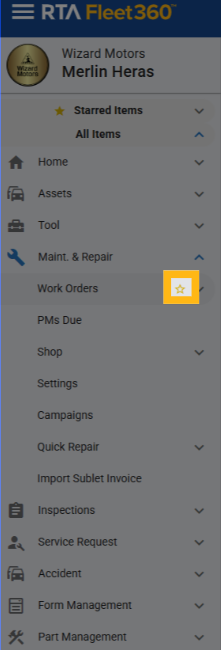
The item is instantly added to the Bookmarks section
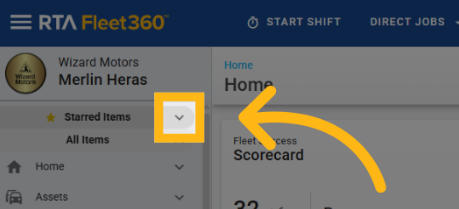
Access it anytime without navigating through menus
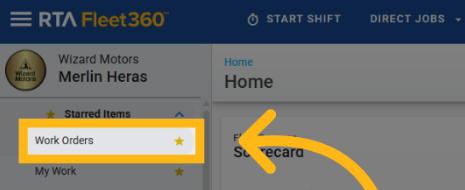
To remove a bookmark:
Click the filled bookmark icon
The item is removed from the Bookmarks section
Behavior & Rules
User-Specific Personalization
Bookmarks are saved per user
Preferences persist across sessions
No Impact on Permissions
Bookmarking does not grant or restrict access
Users only see items they already have permission to access
Navigation Structure Remains Unchanged
Original menu items stay in their existing locations
Bookmarks act as shortcuts, not replacements
Icon Consistency
Bookmarked child items inherit the parent navigation icon
No Nested Menus in Bookmarks
The Bookmarks section displays items as a flat list
Dropdown or expandable menus are not supported in this section
Benefits
Faster Navigation
Reduces time spent searching or expanding menus
Personalized Experience
Users can tailor navigation to match their workflow
Improved Efficiency
Especially valuable for frequent or power users
Simple and Intuitive
Easy to use with minimal learning curve