Current Inventory List by Fit Code
Summary/Use Case
Report Summary
The Current Inventory List by Fit Code report lists active parts in inventory, grouped by their fit code assignment and filtered by facility, stock/consignment/chargeable flags, and part type. Fleet managers can use this to quickly verify stocking levels, review recent purchasing details, and spot items with on-order or backorder quantities.
Use Case
Validate on-hand quantities versus reorder points to prevent stockouts
Audit parts with open backorders (BO Qty) or on-order quantities (OO Qty) to expedite purchasing
Review last PO number/vendor/date and pricing to confirm sourcing and markup accuracy
Filter by part type (e.g., Tire, Oil, HydraulicFluid) to prepare cycle counts by category
Identify non-stock or consignment parts carried at a location for policy compliance
Location: Where to Find It
Reports > RTA Standard Reports > Parts > Current Inventory List by Fit Code
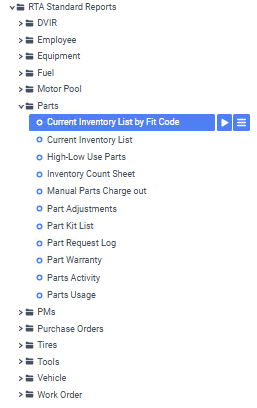
Data Filter Prompts
You will be prompted for filtering of the Data to specify and narrow down the data that will be pulled. See Data Filter List Below for Options
Data Filter List
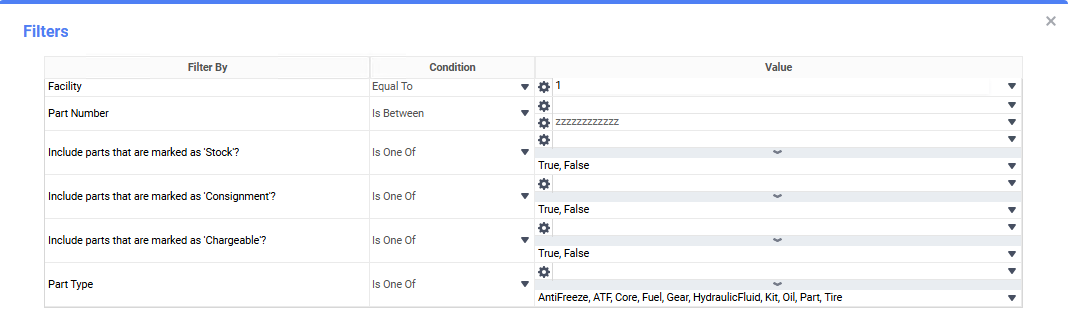
Filter Name | Recommended Filter Condition(s) | Value (Options) | Value (Default) | Value (Notes) |
|---|---|---|---|---|
Facility | Equal To | Valid facility IDs | 1 | Restrict to a single facility for accurate counts. |
Part Number | Is Between | Low: blank; High: zzzzzzzzzzzz | Low: blank; High: zzzzzzzzzzzz | blank and “zzzz…” represent the first and last possible values for this field filter (full range). |
Include parts that are marked as ‘Stock’? | Is One Of | True, False | True, False | Include both to see all; set to True to limit to stocking parts. |
Include parts that are marked as ‘Consignment’? | Is One Of | True, False | True, False | Include both to see all; set to True to limit to consignment only. |
Include parts that are marked as ‘Chargeable’? | Is One Of | True, False | True, False | Include both to see all; set to True to limit to chargeable items. |
Part Type | Is One Of | AntiFreeze, ATF, Core, Fuel, Gear, HydraulicFluid, Kit, Oil, Part, Tire | AntiFreeze, ATF, Core, Fuel, Gear, HydraulicFluid, Kit, Oil, Part, Tire | Choose one or more to focus on specific categories. |
Report Output and Data Elements
Report Output
The Current Inventory List by Fit Code displays part master details with quantities and purchasing info, grouped by fit code and facility. You’ll see columns for part identification, reorder settings, backorder/on-order quantities, last PO details (number, vendor, date), pricing/markup, lead time (ship days), and on-hand total cost.
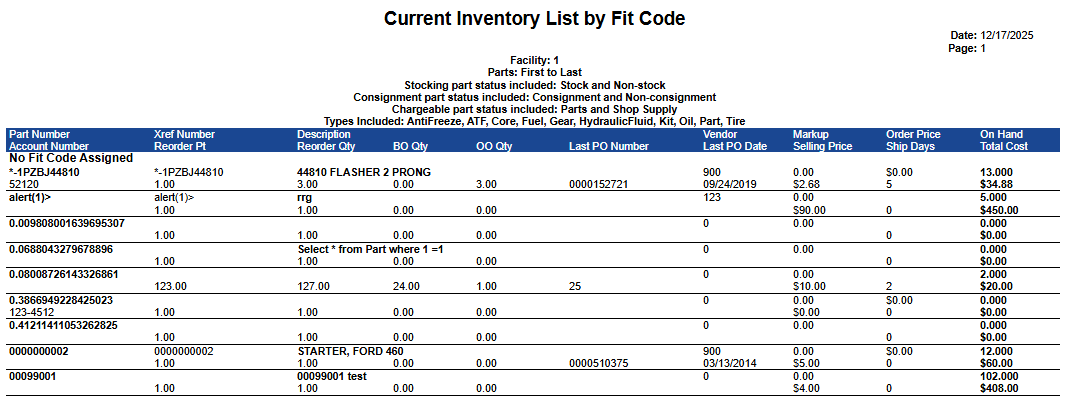
Report Data Elements
Column Number | Column Title | Data Notes (the purpose of that datapoint) |
|---|---|---|
1a | Part Number | Primary part identifier; shows the part or account number |
1b | Account Number | Account code that has been assigned to the part |
2a | Xref Number | Cross-reference/vendor part number |
2b | Reorder Pt | Minimum on-hand quantity that triggers reordering |
3a | Description | Part description for identification |
3b | Reorder Qty | Standard quantity to order when at/below reorder point |
4b | BO Qty | Units currently on backorder |
5b | OO Qty | Units currently on order (open purchase orders) |
6b | Last PO Number | Most recent purchase order number for this part |
7a | Vendor | Vendor code/ID from the last PO |
7b | Last PO Date | Date of the most recent purchase |
8a | Markup | Markup percentage applied to the part’s cost |
8b | Selling Price | Current selling price (post-markup) for chargeable parts |
9a | Order Price | Unit cost used on the last PO |
9b | Ship Days | Typical shipping/lead time in days |
10a | On Hand | Total part quantity on-hand between all bin locations |
10b | Total Cost | Total quantity of part multiplied by parts average price |