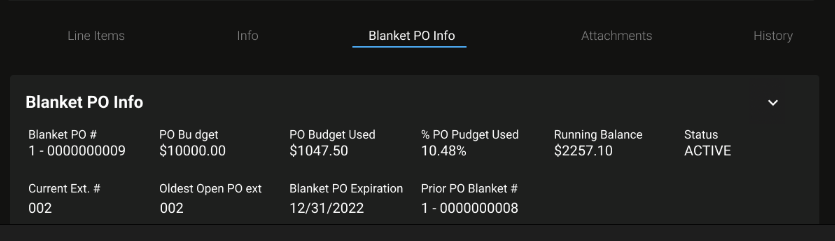
Purchase Order File Blanket PO Info Tab
The Blanket PO Info Tab is a read-only panel displaying specific blanket items. If there is no blanket PO for the specific PO accessed, it will display as “No Data.”
This tab is read only. Blanket details such as the Blanket PO Number, PO Budget, dates, and Current Ext. number are set on the vendor file, not on the Purchase Order. To change them, edit the Vendor File Blanket PO Info tab (requires the Vendors edit permission). See Vendor File Blanket PO Info Tab. The Blanket PO Number itself cannot be changed on an existing blanket; to use a different number, close the current blanket PO and create a new one.
Refer to Blanket Purchase Orders for information on how to set these up for use.
When blanket info is present, the following fields will be visible:
Blanket PO# - The Blanket PO number
PO Budget - The total amount budgeted for the blanket PO for the vendor
PO Budget Used - The total amount of the budgeting amount that has been used to date
%PO Budget Used - Percentage of the budget that has been used to date
Running Balance - Displays the total running balance/outstanding balance which includes amounts currently on open POs
Status - Status of the Blanket
Current Ext. # - Current Blanket PO extension number
Oldest Open PO ext - Displays the PO extension number for the oldest open PO
Blanket PO Expiration - Displays the expiration date for the blanket PO
Prior PO Blanket # - Displays the PO number for the prior blanket PO