Fueling Records
Summary/Use Case
Report Summary
Fueling Records provides an aggregate of fuel transactions for assets over a selected date range, with optional grouping (Class, Customer, Department, None/Vehicle) and roll-up totals. Fleet managers use this report to analyze fuel and fluid spend/usage patterns, monitor operational cost trends, and support internal cost allocation by organizational groupings.
Use Case
Review fuel, oil, and other quantities/costs by vehicle to identify high-cost or high-usage units
Group results by Department / Customer / Class to support chargebacks, budgeting, and cost-center reporting
Validate fuel activity within a period (e.g., monthly close) and investigate unexpected spend spikes
Compare fuel spend across vehicle groupings to identify operational inefficiencies or misuse
Use MPG and miles context to support fuel economy and utilization review (where populated)
Location: Where to Find It
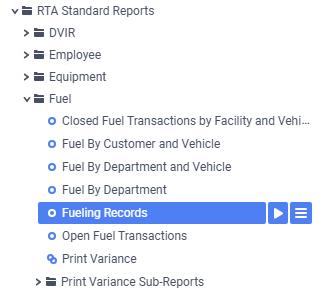
Reports > RTA Standard Reports > Fuel > Fueling Records
Data Filter Prompts
You will be prompted for filtering of the Data to specify and narrow down the data that will be pulled. See Data Filter List Below for Options
Parameter List

Parameter Name | Value (Default) | Value (Notes) |
|---|---|---|
Please select Customer, Department, or Class for grouping (None to skip grouping) | Class | Determines the primary grouping used to organize the report output (selection drives report layout/totals). |
Include Class as secondary grouping and totals? This grouping will be skipped if the primary grouping is “Class”. | False | When enabled, adds Class as a secondary roll-up (unless Class is already the primary grouping). |
Data Filter List
Filter Name | Recommended Filter Condition(s) | Value (Options) | Value (Default) | Value (Notes) |
|---|---|---|---|---|
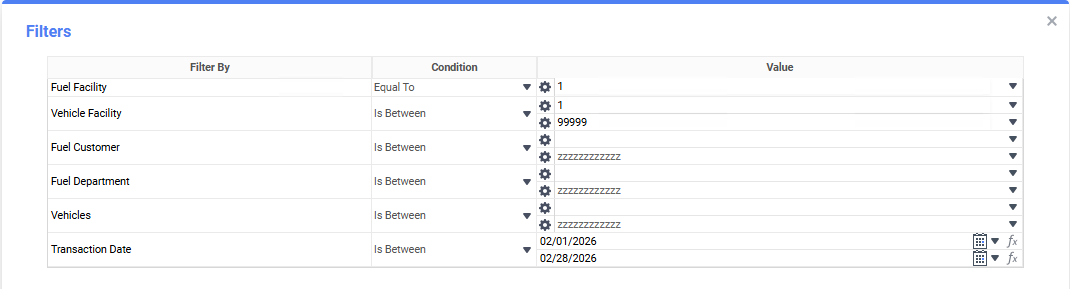
Fuel Facility | Equal To | Facility ID | 1 | Filters transactions by the fueling facility. |
Vehicle Facility | Is Between | Low: 1 | High: 99999 | Low: 1 | High: 99999 | Limits vehicles to a facility range. |
Fuel Customer | Is Between | Low: blank | High: zzzzzzzzzzzzz | Low: blank | High: zzzzzzzzzzzzz | blank to “z…” represents the first and last possible values for this field filter (i.e., includes all customers). |
Fuel Department | Is Between | Low: blank | High: zzzzzzzzzzzzz | Low: blank | High: zzzzzzzzzzzzz | blank to “z…” represents the first and last possible values for this field filter (i.e., includes all departments). |
Vehicles | Is Between | Low: blank | High: zzzzzzzzzzzzz | Low: blank | High: zzzzzzzzzzzzz | blank to “z…” represents the first and last possible values for this field filter (i.e., includes all vehicles). |
Transaction Date | Is Between | Start Date | End Date | First to Last Day of Previous Month | Default reflects the previous month |
Report Output and Data Elements
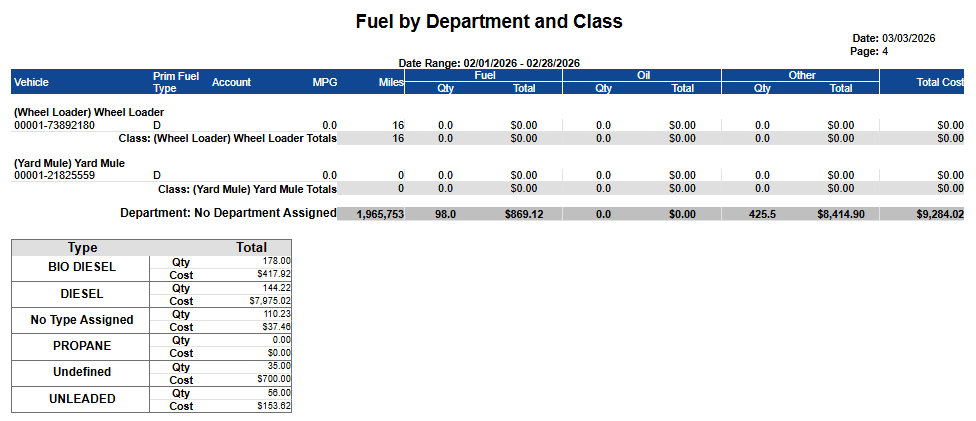
Fueling Records produces a transaction summary-style listing by vehicle (and by the selected grouping), showing fuel type context plus quantities and costs for Fuel, Oil, and Other, along with an overall Total Cost. The output includes subtotal lines (e.g., by Class and/or Department depending on parameters) and a summary box that totals Qty and Cost by Fuel Type for the selected period.
Report Output
Report Data Elements
Column Number | Column Title | Data Notes |
|---|---|---|
1 | Vehicle Facility - Vehicle | 5-digit asset facility and asset number shown for the fueling records line |
2 | Prim Fuel Type | Primary fuel type code associated with the asset master file |
3 | Account | Fueling account or billing/account code tied to the transaction (where applicable) |
4 | MPG | Fuel economy value displayed for the line; this is calculated by taking the total miles travelled in date range and dividing by the quantity fluids in “Fuel” bucket transactions; will be incorrect if any odometer readings are faulty |
5 | Miles | Total miles the vehicle has travelled in date range; will be incorrect if any odometer readings are faulty |
6 | Fuel Qty | Quantity of fuel dispensed (in configured units); adds fuel transactions that have “Storage” type of “Fuel” |
7 | Fuel Total | Total fuel cost for the line; adds fuel transactions that have “Storage” type of “Fuel” |
8 | Oil Qty | Quantity of oil dispensed; adds fuel transactions that have “Storage” type of “Oil” |
9 | Oil Total | Total oil cost for the line; adds fuel transactions that have “Storage” type of “Oil” |
10 | Other Qty | Quantity of “other” fluid/product dispensed; adds fuel transactions that do not have “Storage” type of “Fuel” or “Oil” |
11 | Other Total | Total “other” cost for the line; adds fuel transactions that do not have “Storage” type of “Fuel” or “Oil” |
12 | Total Cost | Combined cost across Fuel + Oil + Other for the line |
Output roll-ups shown in the sample: subtotal lines appear for Class/Customer/Department and Report level totals, plus a Type / Qty / Cost summary box by fuel type.