Purchase Orders - Open
Summary/Use Case
Report Summary
The Purchase Orders – Open report lists all POs that are currently Open or Partial for the selected facilities, vendors, parts, and PO range. Fleet managers use this to monitor outstanding commitments, track days open, and prioritize follow-ups with suppliers.
Use Case
Review all open/partial POs to expedite receipts and close old orders
Track Days Open to manage supplier performance and resolve delays
See received costs to date (freight/tax/parts) versus On Order Total to understand remaining liability
Filter by vendor or part to prepare targeted chase lists
Location: Where to Find It
Reports > RTA Standard Reports > Purchase Orders > Purchase Orders – Open
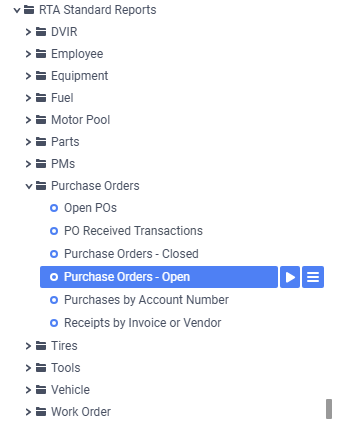
Data Filter Prompts
You will be prompted for filtering of the Data to specify and narrow down the data that will be pulled. See Data Filter List Below for Options
Parameter List

Parameter Name | Value (Default) | Value (Notes) |
|---|---|---|
Group on PO Vendor? | True | When True, results are grouped by Vendor with vendor-level totals |
Data Filter List
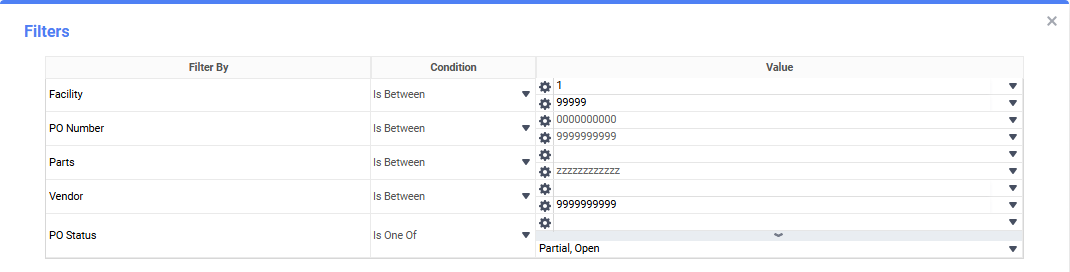
Filter Name | Recommended Filter Condition(s) | Value (Options) | Value (Default) | Value (Notes) |
|---|---|---|---|---|
Facility | Is Between | Low: 1; High: 99999 | Low: 1; High: 99999 | Range allows single or multiple facilities. |
PO Number | Is Between | Low: 0000000000; High: 9999999999 | Low: 0000000000; High: 9999999999 | Full numeric PO range. |
Parts | Is Between | Low: blank; High: zzzzzzzzzzzz | Low: blank; High: zzzzzzzzzzzz | blank and “zzzz…” represent the first and last possible values for this field filter (full range). |
Vendor | Is Between | Low: blank; High: 9999999999 | Low: blank; High: 9999999999 | Use low blank for the earliest possible vendor through the max number. |
PO Status | Is One Of | Partial, Open | Partial, Open | Limits to open/partial POs only. |
Report Output and Data Elements
Report Output
The Purchase Orders – Open report shows each open or partial PO with vendor details, PO status, creation date, days open, line counts (open/partial/complete/total), received costs to date (freight, tax, parts, total), and remaining On Order Total. When grouped by vendor, each vendor section includes vendor subtotals.
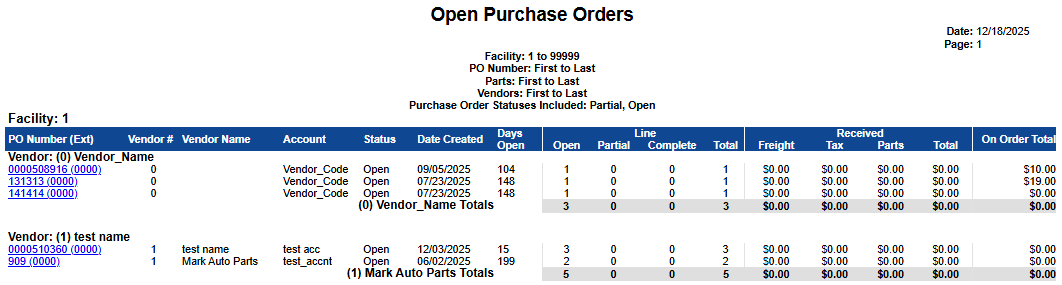
Report Data Elements
Column Number | Column Title | Data Notes (the purpose of that datapoint) |
|---|---|---|
1 | PO Number (Ext) | External/printed PO number |
2 | Vendor # | Vendor identifier |
3 | Vendor Name | Vendor name |
4 | Account | Account/charge code on the PO |
5 | Status | Current PO status (Open or Partial) |
6 | Date Created | Creation date of the PO |
7 | Days Open | Number of days from creation to the report run date |
8 | Line – Open | Count of PO lines still fully open |
9 | Line – Partial | Count of lines partially received |
10 | Line – Complete | Count of lines fully received |
11 | Line – Total | Total number of lines on the PO |
12 | Received – Freight | Freight cost received to date |
13 | Received – Tax | Tax received to date |
14 | Received – Parts | Parts cost received to date |
15 | Received – Total | Total received cost to date (Freight + Tax + Parts) |
16 | On Order Total | Remaining amount yet to be received/committed |