PO Received Transactions
Summary/Use Case
Report Summary
The PO Received Transactions report lists part receipt activity from purchase orders, grouped by your chosen primary field (Date, Part, PO Number, or Vendor). Fleet managers can use it to reconcile receipts against invoices/POs, analyze landing costs (part cost + freight + tax), and validate vendor activity by facility.
Use Case
Reconcile AP invoices and PO receipts by vendor and date
Audit that all items on open POs were actually received and posted
Review landed cost components (part cost, freight, tax) to spot anomalies
Summarize receipts by part to identify top purchased items over a period
Location: Where to Find It
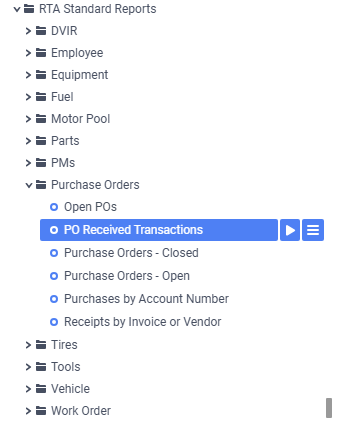
Reports > RTA Standard Reports > Purchase Orders > PO Received Transactions
Related report in the same folder: Receipts by Invoice or Vendor (receipts sorted by invoice number and vendor, with invoice and vendor totals).
Data Filter Prompts
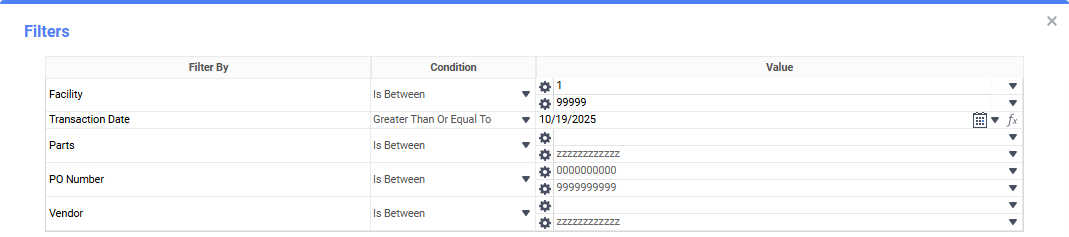
You will be prompted for filtering of the Data to specify and narrow down the data that will be pulled. See Data Filter List Below for Options
Parameter List

Parameter Name | Value (Default) | Value (Notes) |
|---|---|---|
Please select Date, Part, PO Number, or Vendor for primary grouping | Date | Determines the first-level grouping of results. Options: Date, Part, PO Number, Vendor. |
Data Filter List
Filter Name | Recommended Filter Condition(s) | Value (Options) | Value (Default) | Value (Notes) |
|---|---|---|---|---|
Facility | Is Between | Low: 1; High: 99999 | Low: 1; High: 99999 | Use a single facility or a range; current default spans all. |
Transaction Date | Greater Than Or Equal To | Any valid date | 60 Days Ago | Start date of receipts included. |
Parts | Is Between | Low: blank; High: zzzzzzzzzzzz | Low: blank; High: zzzzzzzzzzzz | blank and “zzzz…” represent the first and last possible values for this field (full range). |
PO Number | Is Between | Low: 0000000000; High: 9999999999 | Low: 0000000000; High: 9999999999 | Full numeric PO range. |
Vendor | Is Between | Low: blank; High: zzzzzzzzzzzzzzzz | Low: blank; High: zzzzzzzzzzzzzzzz | blank and “zzzz…” represent the first and last possible values for this field (full range). |
Report Output and Data Elements
Report Output
The PO Received Transactions report shows each receipt line with date, part, PO number, whether the line is marked received, related WO/line (if applicable), invoice number, account, quantity, and cost components (part cost, freight, tax) with an extended total. Results are grouped by your selected parameter (default: Date) and by Vendor within Facility. Vendor and/or facility subtotals are provided, including totals of Qty, Part Cost, Freight, Tax, and Total.

Report Data Elements
Column Number | Column Title | Data Notes (the purpose of that datapoint) |
|---|---|---|
1 | Date | Receipt posting date |
2 | Part | Part number received |
3 | PO Number | Purchase order associated with the receipt |
4 | Rcvd? | Indicates whether the PO line is flagged as fully received (Y/N) |
5 | WO # (Ln) | Work order and line tied to the receipt, when applicable |
6 | Invoice # | Vendor invoice reference used for AP reconciliation |
7 | Account | GL/account or charge code applied to the receipt |
8 | Qty | Quantity received on that transaction line |
9 | Part Cost | Extended cost of parts only (Qty × unit cost) |
10 | Freight | Freight cost applied to the receipt line |
11 | Tax | Tax applied to the receipt line |
12 | Total | Landed cost for the line (Part Cost + Freight + Tax) |