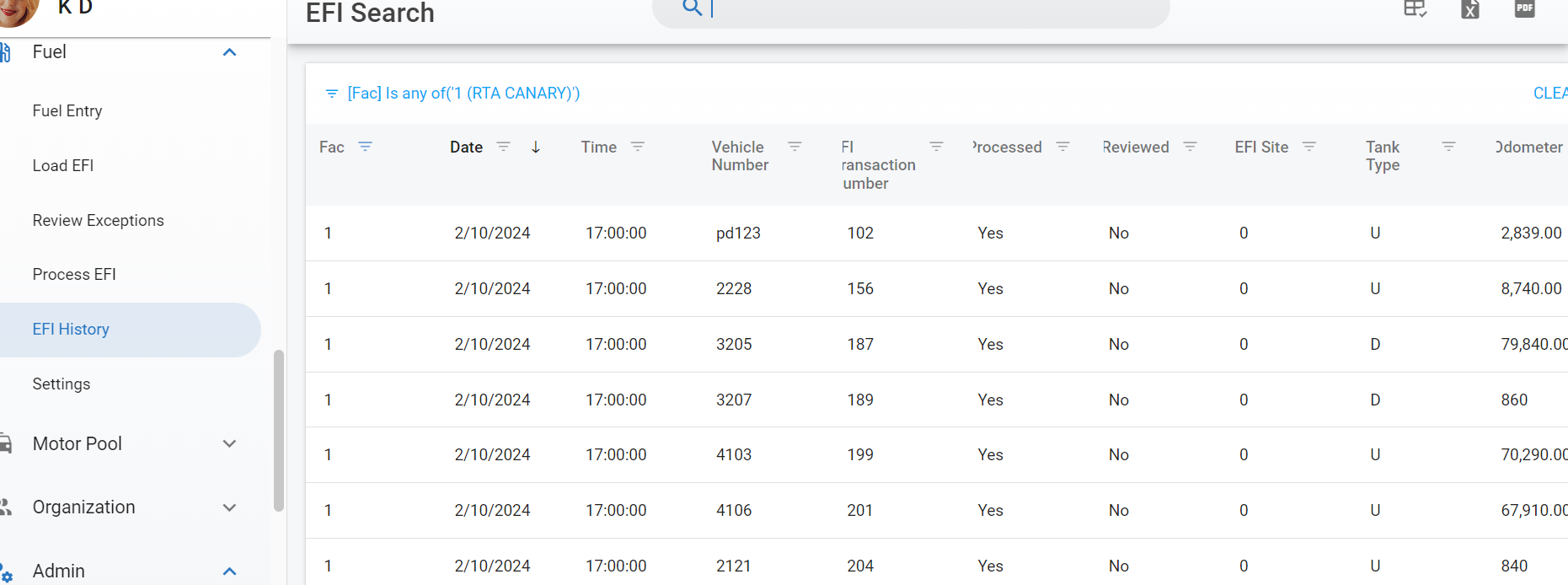
Fuel - EFI History
Use EFI History to view all fuel transactions, processed or not. Navigate to EFI History under Fuel from the main menu.
The list displayed shows all fuel transactions and operates like any master list which can be sorted, searched, customized, and exported.
Refer to Master List Functions TOC for more information on master lists.
The list includes the Processed, Reviewed, Exception Type and Process Error columns, plus Meter Updated and Total $. To get a printable list of transactions that still need attention, filter Processed to No, or sort or filter Process Error to group the failures by reason, then use the toolbar menu to Export to Spreadsheet or Export to PDF.
Columns to know
| Column | What it shows |
|---|---|
| Processed | Yes when the transaction has been posted to the asset; No while it is still waiting on Process EFI. |
| Reviewed | Yes when someone opened the transaction in Review Exceptions and saved or skipped it. |
| Exception Type | The exception raised at load or review, for example Vehicle Not Found or Mileage High. |
| Process Error | Why the transaction did not post when it was processed. Blank when it posted cleanly. Sort or filter this column to work through failures by reason. |
| Meter Updated | Yes when processing wrote the transaction's odometer to the asset's meter; No when it did not — for example the reading was lower than the asset's current meter, or the transaction has not been processed. |
| Total $ | The transaction total in your currency. Blank when the transaction has no total on file. |
| Module | The fuel module the transaction was loaded through. This column was labeled System before 26.11; saved layouts and exports that referenced System pick up the new name. |
Refer to Fuel - EFI Review Exceptions.