Vehicle Audit
Summary/Use Case
Report Summary
The Vehicle Audit report provides an overview of costs and usage metrics for each vehicle within a specific facility over a designated date range. This report is useful for fleet managers to evaluate cost components such as labor, fuel, and parts associated with each vehicle, aiding in expense tracking, budget analysis and calculating total cost of ownership (TCO).
Use Case
Monitor individual vehicle costs for better expense control and forecasting
Analyze labor hours and parts usage to assess maintenance demands
Identify high-cost vehicles for potential replacement or reassignment
Track fuel and lubricant expenses for operational efficiency
Support budget planning by summarizing total vehicle costs over time
Location: Where to Find It
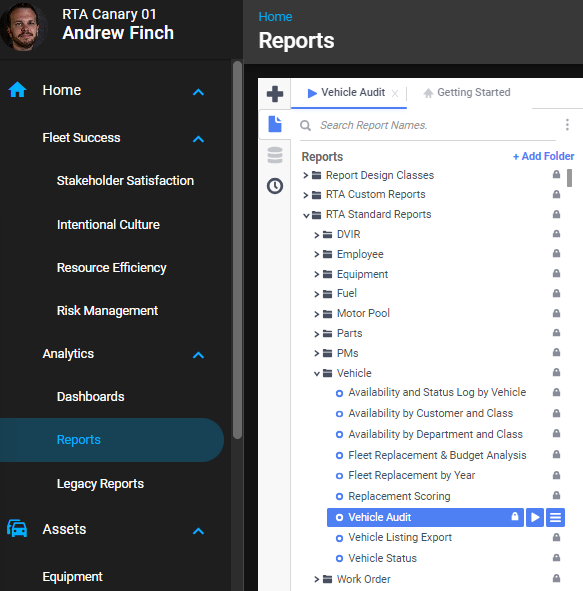
Reports > RTA Standard Reports > Vehicle > Vehicle Audit
Data Filter Prompts
You will be prompted for filtering of the data to specify and narrow down the data that will be pulled. See Data Filter List below for options.
Parameter List

Parameter Name | Value (Default) | Value (Notes) |
|---|---|---|
Please select Customer or Department for grouping (None to skip grouping) | Customer | Allows grouping by Customer or Department If None is selected, Customer and Department groupings/sorts will be ignored and will move to sorting by either Class or Vehicle (dependent on the Class grouping option below) |
Include Class grouping and totals? | False | Determines whether class-level grouping and totals are included If False, the report will default to a list sorted by vehicle If True, the report will contain groupings and totals by Class |
Data Filter List
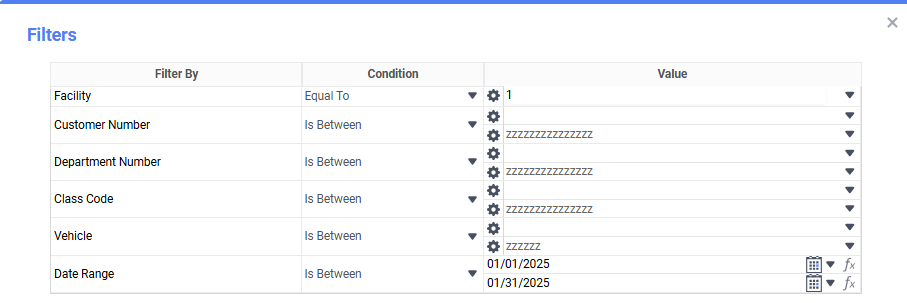
Filter Name | Recommended Filter Condition(s) | Value (Options) | Value (Default) | Value (Notes) |
|---|---|---|---|---|
Facility | Equal To | Any Facility Number | 1 | Single Facility |
Customer Number | Is Between | Any Customer Number Range | blank - “zzzzzzzzzzzzzzzz” | Filters by customer number range |
Department Number | Is Between | Any Department Number Range | blank - “zzzzzzzzzzzzzzzz” | Filters by department number range |
Class Code | Is Between | Any Class Code Range | blank - “zzzzzzzzzzzzzzzz” | Filters by vehicle class code range |
Vehicle | Is Between | Any Vehicle Range | blank - “zzzzzz” | Filters by vehicle range |
Date Range | Is Between | Any Date Range | First to Last Day of Previous Month | Filters data by date range |
Report Output and Data Elements
Report Output
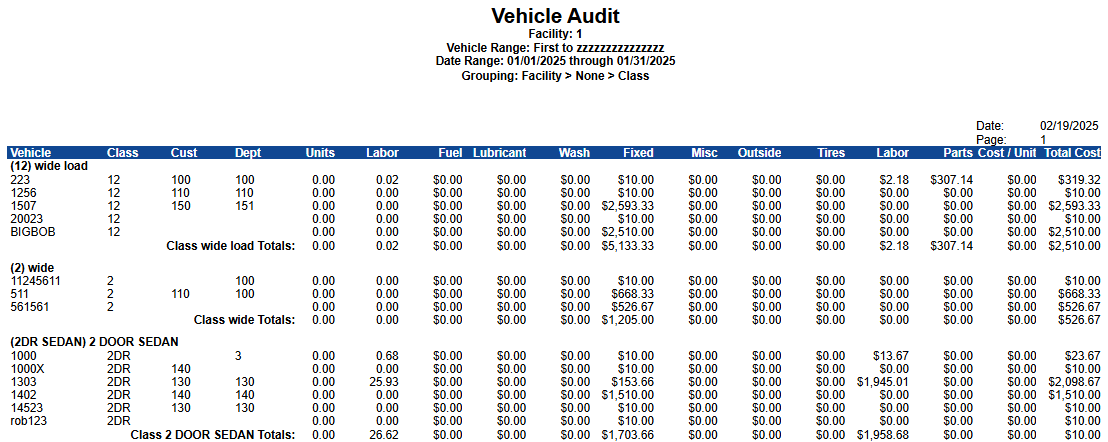
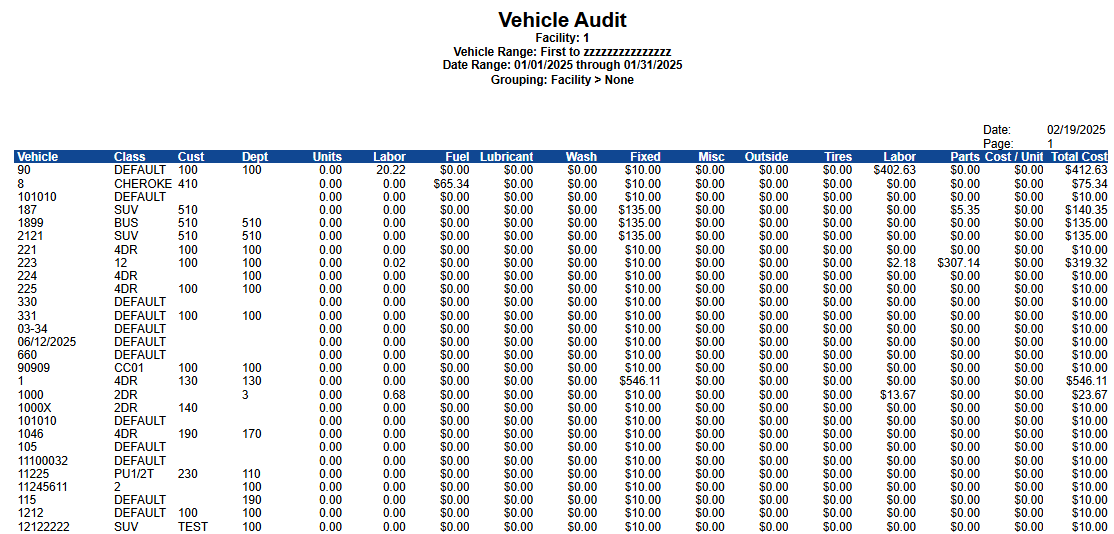
The Vehicle Audit Report presents a structured table displaying vehicle-related costs and usage within the specified filters. The report includes columns such as Vehicle, Class, Customer, Department, Units, Labor, Fuel, Lubricant, Fixed Costs, and more. Summarized totals for fleet-wide expenses are included at the bottom.
*If Customer / Department grouping IS included and Class grouping IS NOT included
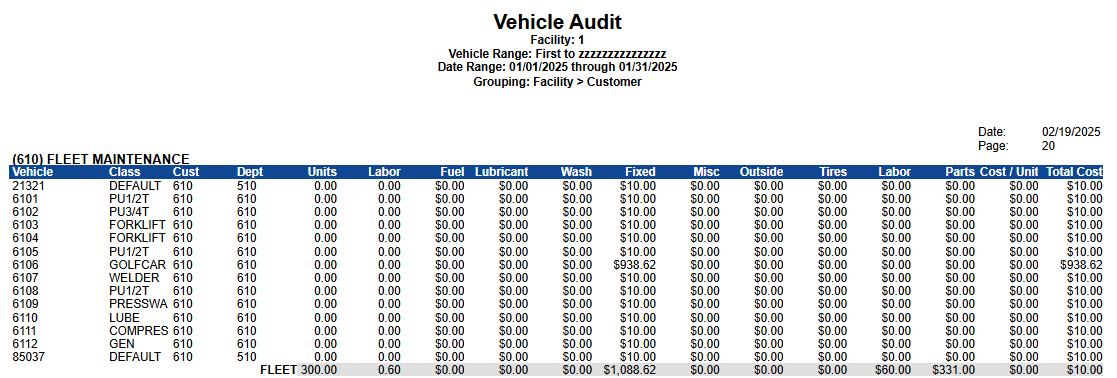
*If Customer / Department grouping IS included and Class grouping IS included
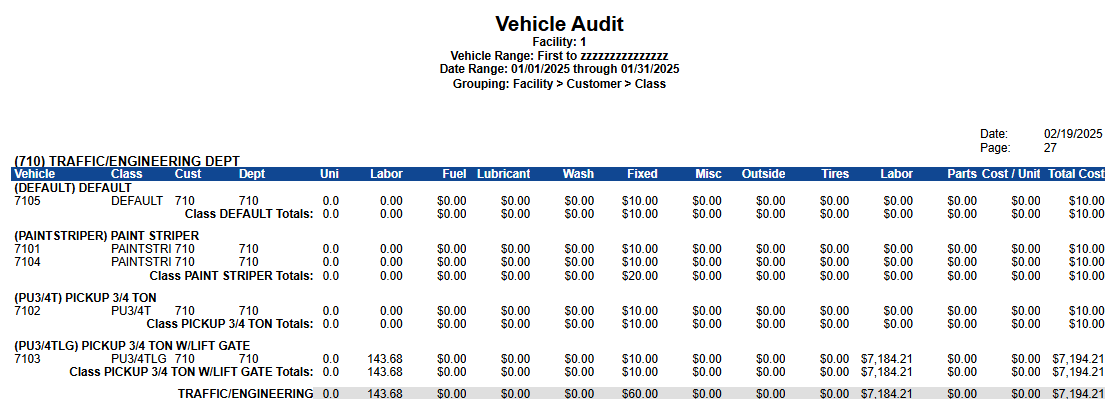
*If Customer / Department grouping IS NOT included and Class grouping IS included
*If Customer / Department grouping IS NOT included and Class grouping IS NOT included
Report Data Elements
Column Number | Column Title | Data Notes |
|---|---|---|
1 | Vehicle | Vehicle/unit identifier. |
2 | Class | Vehicle class code and description. |
3 | Cust | Customer number assigned to the vehicle. |
4 | Dept | Department number assigned to the vehicle. |
5 | Units | Meter units the vehicle accumulated during the date range. This comes from the vehicle's meter readings, not from its cost transactions. |
6 | Labor Hours | Labor hours worked on the vehicle during the date range. Hours, not dollars. |
7 | Fuel $ | Fuel cost. |
8 | Fuel Qty | Fuel quantity issued, in your fuel unit of measure (gallons or litres). |
9 | Lub $ | Lubricant cost (oil and other fluids). |
10 | Lub Qty | Lubricant quantity issued. |
11 | Wash | Vehicle wash cost. |
12 | Fixed | Fixed cost: depreciation, appreciation, insurance, licensing and capitalization. |
13 | Misc | Miscellaneous cost, plus any cost category not shown in a column of its own. |
14 | Outside | Cost of work done by an outside vendor: outside labor, outside parts and outside tires. |
15 | Tires | Tire cost, including warranty tires. |
16 | Labor | In-house labor cost, in dollars. This is the cost that goes with the Labor Hours column. |
17 | Parts | In-house parts cost. |
18 | Cost / Unit | Total Cost divided by Units. Blank or zero when the vehicle recorded no meter units in the date range. |
19 | Total Cost | Total of every cost transaction posted to the vehicle in the date range. |
How the quantity columns are calculated
The report has three quantity columns that are not dollars: Labor Hours, Fuel Qty and Lub Qty. All three read the same underlying value, the quantity on the cost transaction, and its unit depends on what kind of transaction it is:
Kind of transaction | What quantity means | Column it appears in |
|---|---|---|
Labor | Labor hours worked | Labor Hours |
Fuel | Fuel issued, in gallons or litres | Fuel Qty |
Oil and other lubricants | Volume issued | Lub Qty |
Parts | Number of parts posted | Not shown on this report |
Because the unit changes with the kind of transaction, a quantity total is only meaningful for one kind of transaction at a time. Adding labor hours to fuel gallons produces a number that means nothing, which is why this report keeps them in separate columns rather than showing one Quantity column.
Where each cost category lands
Each cost transaction carries a cost category, and the report groups those categories into its columns:
Column | Cost categories included |
|---|---|
Labor and Labor Hours | Labor and warranty labor. Labor overhead is included in the Labor cost column. |
Parts | Parts, warranty parts and antifreeze, plus parts overhead. |
Tires | Tires and warranty tires. |
Outside | Outside labor, outside parts and outside tires. |
Fuel $ and Fuel Qty | Fuel. |
Lub $ and Lub Qty | Oil, added oil, automatic transmission fluid, gear oil and hydraulic fluid. |
Wash | Vehicle wash. |
Fixed | Depreciation, appreciation, insurance, licensing and capitalization. |
Misc | Miscellaneous, and every other category, including accident, lease, loan, administrative fee and tax. |
Outside labor hours are not in the Labor Hours column. A vendor invoice posted as outside labor is reported in the Outside cost column, and its hours are not added to Labor Hours. Labor Hours is your own shop time. Warranty labor hours are included, because warranty labor is your own shop time being recovered.
Labor Hours on this report is the same shop time you see on the work orders for that vehicle. If it looks low, check whether the work was posted as outside labor, and whether the work orders fall inside the date range. See Work Order Cost Totals: What Each Amount Includes for how the cost amounts on a work order are built.
The Units column is not the asset’s Life Meter. Units adds up the difference between each pair of consecutive recorded meter readings inside the report’s date range — it is a sum of reading-to-reading deltas, not the life-to-date value shown as Life Meter on the asset.
Only readings posted inside the date range count. Run a wider range, or compare against the same window — a life-to-date figure will not tie to a partial period.
Historical meter-entry noise, old imports, or missing audit rows can leave deltas that no longer reflect the asset’s recalculated life.
Broken Meter corrections fix the asset’s Life going forward; they do not rewrite the reading deltas already logged on earlier dates. See Meter Readings and Corrections.
If the gap cannot be explained by the date range or a visible correction, ask Support to check whether the asset’s audit history needs data cleanup — do not keep entering corrections to force the totals to match.
See also Why reports can show different totals for the same period for why this report’s totals can differ from other reports covering the same period.