Operating Costs
Summary/Use Case
Report Summary
The Operating Costs report summarizes each vehicle’s operating activity and costs for a selected date range, optionally grouped by Customer or Department (and Class). Fleet managers use this to track fuel usage, labor/parts (inside & outside), and other expenses, compare vehicles, and calculate unit cost metrics for budgeting and replacement planning.
Use Case
Benchmark cost per unit (mile/hour) across vehicles, customers, or departments to flag outliers
Review where costs accrue (fuel vs. inside/outside labor & parts) to guide maintenance strategy
Validate that all work and fueling for the period posted to the correct vehicles/groups
Prepare monthly cost rollups for finance and chargeback billing
Location: Where to Find It
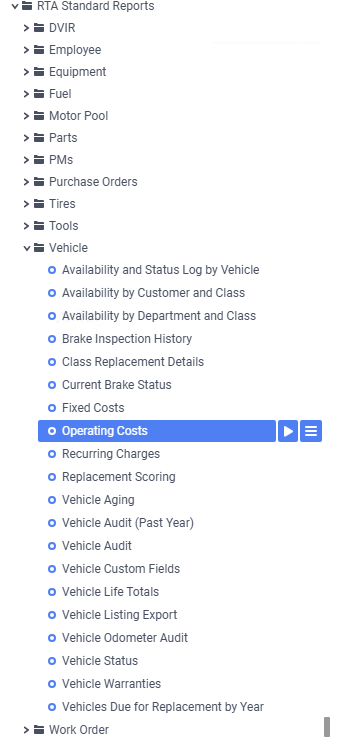
Reports > RTA Standard Reports > Vehicle > Operating Costs
Data Filter Prompts
You will be prompted for filtering of the Data to specify and narrow down the data that will be pulled. See Data Filter List Below for Options
Parameter List

Parameter Name | Value (Default) | Value (Notes) |
|---|---|---|
Please select Customer or Department for grouping (None to skip grouping) | Customer | Options: None, Customer, Department. Adds the chosen grouping to the report. |
Show totals only? | No | When “Yes,” hides detail rows and shows only group/facility totals. |
Include Class grouping and totals? | False | When True, adds Class groupings/totals beneath the selected grouping. |
Data Filter List

Filter Name | Recommended Filter Condition(s) | Value (Options) | Value (Default) | Value (Notes) |
|---|---|---|---|---|
Facility | Equal To | Valid facility IDs | 1 | Run per facility for accurate operational metrics. |
Customer Number | Is Between | Low: blank; High: zzzzzzzzzzzzzzzz | Low: blank; High: zzzzzzzzzzzzzzzz | blank and “zzzz…” represent the first and last possible values for this field filter (full range). |
Department Number | Is Between | Low: blank; High: zzzzzzzzzzzzzzzz | Low: blank; High: zzzzzzzzzzzzzzzz | Use to focus on specific org units. |
Class Code | Is Between | Low: blank; High: zzzzzzzzzzzzzzzz | Low: blank; High: zzzzzzzzzzzzzzzz | Filter to one or more vehicle classes. |
Vehicle | Is Between | Low: blank; High: zzzzzz | Low: blank; High: zzzzzz | Full vehicle range by ID. |
Date Range | Is Between | Any valid start & end date/time | Start: 11/01/2025 12:00 am; End: 11/30/2025 12:00 am | Defaults span the first to last day of November 2025. |
Report Output and Data Elements
Report Output
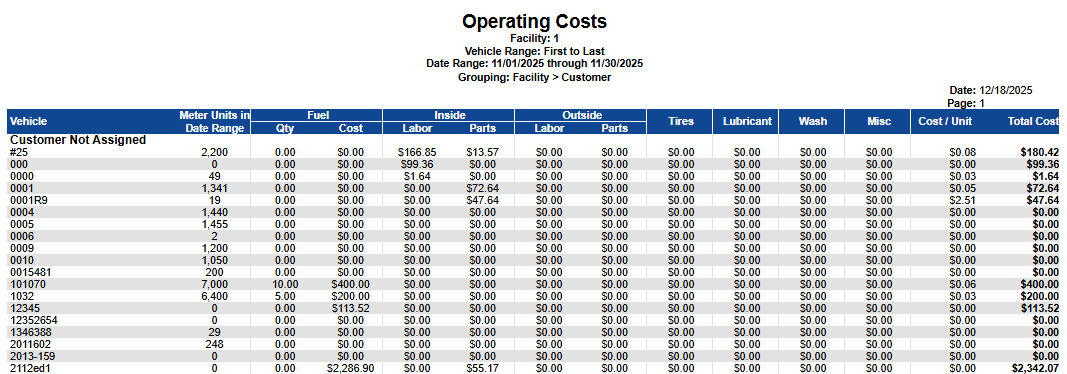
The Operating Costs report lists vehicles (within the chosen groups) with meter units accrued in the date range and all cost categories—Fuel, Inside Labor/Parts, Outside Labor/Parts, Tires, Lubricant, Wash, and Misc—plus Cost / Unit and Total Cost. Group sections (e.g., Customer) include totals; facility totals are also provided when applicable.
Report Data Elements
Column Number | Column Title | Data Notes (the purpose of that datapoint) |
|---|---|---|
1 | Vehicle | Vehicle/unit identifier displayed under the chosen grouping |
2 | Meter Units in Date Range | Miles/hours accumulated in the period; used for cost-per-unit |
3 | Fuel – Qty | Quantity of fuel issued during the date range |
4 | Fuel – Cost | Extended cost for fuel issued |
5 | Inside – Labor | Labor cost performed in-house |
6 | Inside – Parts | Parts cost associated with in-house work |
7 | Outside – Labor | Vendor labor cost for outsourced work |
8 | Outside – Parts | Vendor parts cost for outsourced work |
9 | Tires | Tire-related costs (repairs, replacements) |
10 | Lubricant | Oil/fluids (non-fuel) costs |
11 | Wash | Wash/cleaning expenses |
12 | Misc | Other operating expenses not categorized above |
13 | Cost / Unit | Total Cost divided by Meter Units in Date Range |
14 | Total Cost | Sum of all cost categories for the vehicle within the date range |
Labor hours are not on this report. Operating Costs reports labor and parts as costs only. For labor hours per vehicle over a date range, run Vehicle Audit, which reports Labor Hours alongside the cost columns. The Fuel - Qty column on this report is the fuel quantity from the same cost transactions, in your fuel unit of measure.