Purchase Orders - Closed
Summary/Use Case
Report Summary
The Purchase Orders – Closed report lists POs that have been fully closed within a selected date range, showing vendor, PO dates, costs (freight, tax, parts), and “days open.” Fleet managers can use this to audit purchasing cycle time, reconcile costs by vendor, and confirm closure of POs for the accounting period.
Use Case
Reconcile month-end by confirming which POs closed within the period and their total landed costs
Track supplier performance via Days Open from create to close date
Review freight/tax versus parts cost to spot anomalies or policy issues
Summarize closed POs by vendor to support AP statements and accrual clean-up
Location: Where to Find It
Reports > RTA Standard Reports > Purchase Orders > Purchase Orders – Closed

Data Filter Prompts
You will be prompted for filtering of the Data to specify and narrow down the data that will be pulled. See Data Filter List Below for Options
Parameter List

Parameter Name | Value (Default) | Value (Notes) |
|---|---|---|
Group on PO Vendor? | True | When True, POs are grouped by Vendor with vendor-level subtotals and average Days Open. |
Data Filter List

Filter Name | Recommended Filter Condition(s) | Value (Options) | Value (Default) | Value (Notes) |
|---|---|---|---|---|
Facility | Equal To | Valid facility IDs | 1 | Run per facility for accurate counts and costs |
PO Close Date | Is Between | Low: any date; High: any date | Low: 11/01/2025; High: 11/30/2025 | Defaults span the first to last day of previous month |
Vendor Number | Is Between | Low: blank; High: 9999999999999 | Low: blank; High: 9999999999999 | blank represents the first possible value; paired with the high value gives a full-range vendor filter |
Report Output and Data Elements
Report Output
The Purchase Orders – Closed report displays, by facility and (when parameter is True) by vendor, each PO that closed in the selected range. For each PO it shows key dates, line count, account, and cost components (Freight, Tax, Parts) with a Total. Vendor sections include subtotals and Avg Days Open. Use this to evaluate cycle time and reconcile landed cost by vendor and period.
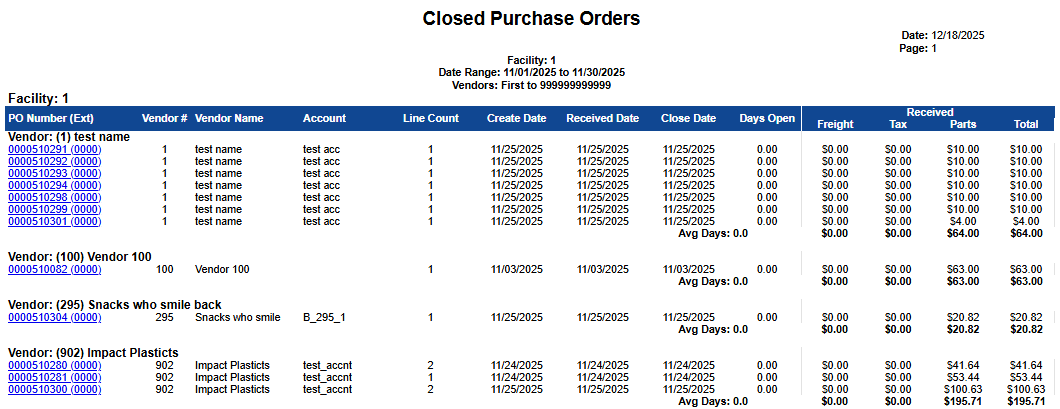
Report Data Elements
Column Number | Column Title | Data Notes (the purpose of that datapoint) |
|---|---|---|
1 | PO Number (Ext) | The PO number with Ext (when applicable). Hyperlink will bring the user to the PO file in Fleet360 |
2 | Vendor # | Vendor identifier on the PO header |
3 | Vendor Name | Supplier name |
4 | Account | Account/charge code applied to the PO header or lines |
5 | Line Count | Number of PO lines included on the order |
6 | Create Date | Date the PO was created |
7 | Received Date | Date items were received (last receipt date for the PO) |
8 | Close Date | Date the PO status changed to Closed |
9 | Days Open | Calculated days between Create Date and Close Date; used for cycle-time KPIs |
10 | Received - Freight | Freight charges associated with the PO |
11 | Received - Tax | Taxes applied to the PO |
12 | Received - Parts | Extended cost of parts received on the PO |
13 | Received - Total | Landed cost: Parts + Freight + Tax for the PO |
— | Vendor Subtotals / Avg Days | For each vendor group: subtotals of Freight, Tax, Parts, Total and Avg Days Open across that vendor’s closed POs |