Tire Listing by Vehicle
Summary/Use Case
Report Summary
The Tire Listing by Vehicle report lists every serialized tire currently assigned to each vehicle, organized by facility and then by vehicle. For each tire it shows the mounting position, tire identifier, status, manufacturer, size, type, mount date and odometer, accumulated miles, months in service, number of recaps, and cost and current value. This report helps fleet managers track tire inventory on assets, monitor tire wear and recap history, and evaluate tire-related costs across the fleet.
Use Case
Review the full set of tires mounted on each vehicle by position
Track tire age (months in service) and accumulated mileage for replacement planning
Monitor recap counts to manage tire lifecycle and retread decisions
Evaluate tire cost and current value by vehicle and facility
Audit tire inventory and status across one or many facilities
Location: Where to Find It
Reports > RTA Standard Reports > Tires > Tire Listing by Vehicle
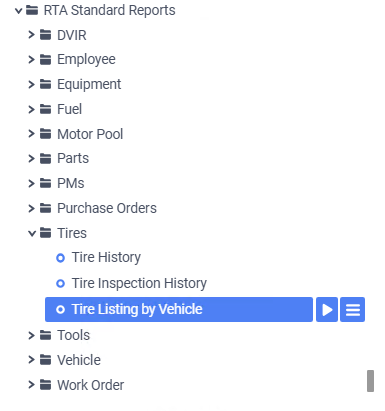
Data Filter Prompts
You will be prompted for filtering of the data to specify and narrow down the data that will be pulled. See Data Filter List below for options.
Data Filter List

Filter Name | Recommended Filter Condition(s) | Value (Options) | Value (Default) | Value (Notes) |
Facility | Is Between | 1 - 99999 | 1 - 99999 | Full facility range |
Vehicle | Is Between | Any Vehicle Number | blank - zzzzzzzzzzzz | Full range of vehicles |
Report Output and Data Elements
The Tire Listing by Vehicle report output displays all tires grouped by facility and then by vehicle. Each vehicle group lists its mounted tires by position, and group footers show a tire count along with subtotals for cost and value. Facility totals and a final Report Totals line summarize the tire count, total cost, and total value across the selected data.
Report Output
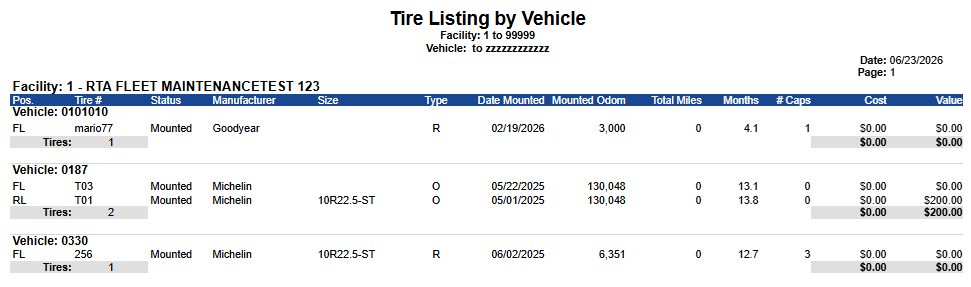
Report Data Elements
Column Number | Column Title | Data Notes |
1 | Pos. | Tire position abbreviation (mounting location on the vehicle) |
2 | Tire # | Serialized tire number / identifier |
3 | Status | Current status description of the tire |
4 | Manufacturer | Tire manufacturer name |
5 | Size | Tire size designation |
6 | Type | Tire type (e.g., new, recap) |
7 | Date Mounted | Date the tire was most recently mounted on the vehicle |
8 | Mounted Odom | Vehicle odometer/meter reading at the time of mounting |
9 | Total Miles | Accumulated miles/meter on the tire |
10 | Months | Months in service since the mount date |
11 | # Caps | Number of times the tire has been recapped |
12 | Cost | Accumulated cost of the tire |
13 | Value | Current value of the tire |