EFI Transactions
Summary/Use Case
Report Summary
The EFI Transaction List report provides a detailed log of electronic fuel interface (EFI) transactions within a specified date range. Each transaction is shown with its date, time, vehicle, fueling site, pump, product, price, quantity, and total cost, along with processing and review status flags. Transactions are grouped by facility and then by either date or vehicle (per parameter selection), with count and cost totals at each grouping level and for the report as a whole. This report helps fuel and fleet managers reconcile fueling activity, verify that transactions are processed and posted to the correct vehicles, and monitor fuel volume and spend.
Use Case
Reconcile electronic fuel transactions against fueling sites, pumps, and cards
Verify that transactions have been reviewed, processed, and posted to the correct vehicle
Identify unprocessed transactions or vehicles not yet posted
Monitor fuel quantity, unit price, and total spend by facility, date, or vehicle
Audit fueling activity by department, driver card, and vehicle card
Location: Where to Find It
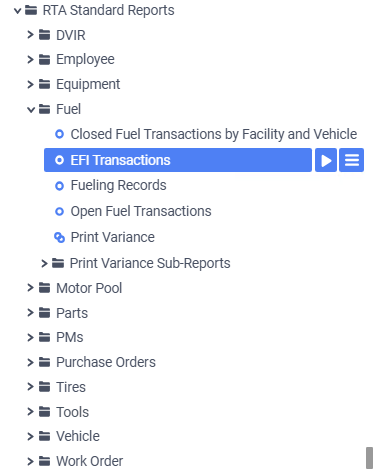
Reports > RTA Standard Reports > Fuel > EFI Transaction List
Data Filter Prompts
You will be prompted for filtering of the data to specify and narrow down the data that will be pulled. See Data Filter List below for options.
Parameter List

Parameter Name | Value (Default) | Value (Notes) |
Please select Date or Vehicle for grouping | Date | Choose whether to group transactions by Date or by Vehicle |
Data Filter List
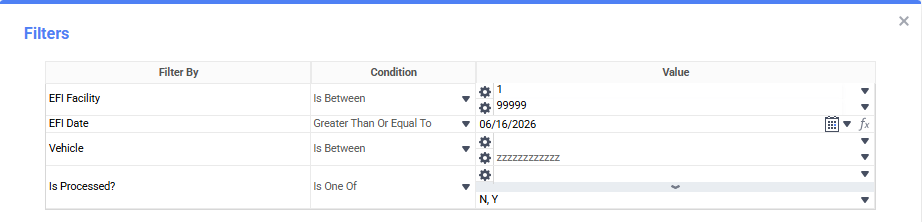
Filter Name | Recommended Filter Condition(s) | Value (Options) | Value (Default) | Value (Notes) |
EFI Facility | Is Between | 1 - 99999 | 1 - 99999 | Full facility range |
EFI Date | Is Greater Than or Equal To | Any Date | Today Minus 7 Days | Pulls transactions on or after the selected date |
Vehicle | Is Between | Any Vehicle Number | blank - zzzzzzzzzzzz | Full range of vehicles (first to last) |
Is Processed? | Is One Of | N, Y | N and Y | Include processed and/or unprocessed transactions |
Report Output and Data Elements
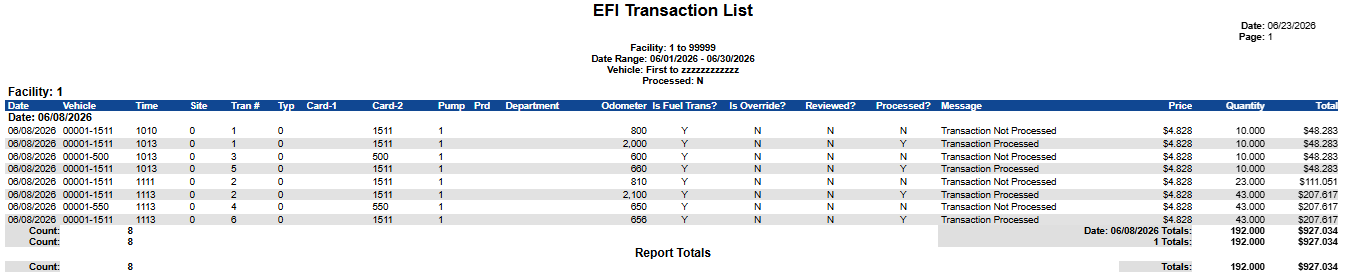
The EFI Transaction List output displays each fuel transaction within the selected date range, organized by facility and grouped by date or vehicle according to the grouping parameter. Each grouping shows a transaction count and quantity/total subtotals, and the bottom of the report summarizes the count, quantity, and total cost for the entire data set.
Report Output
Report Data Elements
Column Number | Column Title | Data Notes |
1 | Date | Date of the fuel transaction |
2 | Vehicle | Facility-prefixed vehicle identifier (facility-vehicle) |
3 | Time | Time the transaction occurred (HHMMSS) |
4 | Site | Fueling site where the transaction took place |
5 | Tran # | Transaction number |
6 | Typ | Transaction type code |
7 | Card-1 | Driver card number used |
8 | Card-2 | Vehicle card number used |
9 | Pump | Pump number dispensing the fuel |
10 | Prd | Product code dispensed |
11 | Department | Department number associated with the transaction |
12 | Odometer | Odometer reading captured at fueling |
13 | Is Fuel Trans? | Indicates whether the record is a fuel transaction |
14 | Is Override? | Indicates whether the transaction was manually overridden |
15 | Reviewed? | Whether the transaction has been reviewed (Y/N) |
16 | Processed? | Whether the transaction record has been processed (Y/N) |
17 | Message | Status message: Transaction Not Processed, Vehicle Not Posted, or Transaction Processed |
18 | Price | Unit price of the fuel |
19 | Quantity | Quantity of fuel dispensed |
20 | Total | Total cost of the transaction (Price x Quantity) |