Repairs and Maintenance Summary
Summary/Use Case
Report Summary
The Repairs and Maintenance Summary report provides a high-level cost rollup of all repair and maintenance work, organized by facility with optional Customer or Department sub-grouping. For each grouping it totals labor hours, labor cost, parts cost, tires cost, outside-vendor cost (OL/OP/OT transaction types), and warranty cost (WL/WP/WT transaction types), then presents a combined total cost. Work orders are included based on their close (end) date. This report corresponds to Classic report 8-214/RA (CSTSUMRY).
Use Case
Compare total maintenance spend across facilities for a given period
Break down repair costs into labor, parts, tires, outside-vendor, and warranty components
Roll up costs by Customer or Department for chargeback and budget review
Track period-over-period maintenance cost trends by close date
Support budget forecasting using summarized historical cost data
Location: Where to Find It
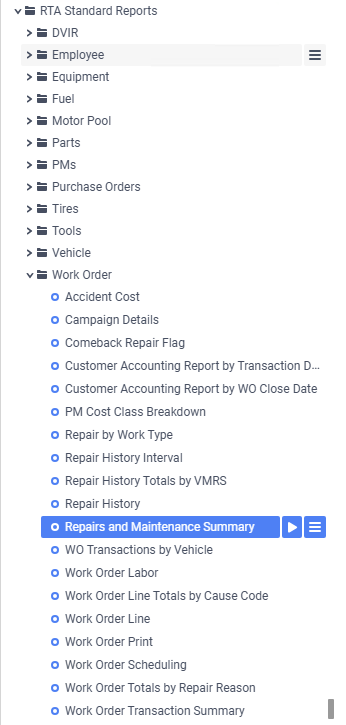
Reports > RTA Standard Reports > Work Order > Repairs and Maintenance Summary
Data Filter Prompts
You will be prompted to filter the data to specify and narrow down what will be pulled. You also choose how the report is grouped. See the lists below for options.
Parameter List

Parameter Name | Value (Default) | Value (Notes) |
Please select Customer or Department for grouping (None to skip sub-grouping) | Customer | Choose whether to add a Customer or Department sub-group beneath Facility, or None for facility-only totals |
Data Filter List

Filter Name | Filter Condition | Value (Options) | Value (Default) | Notes |
Work Order Facility | Is Between | 1 – 99999 | 1 – 99999 | Full facility range |
WO Close Date | Is Between | Any date range | First to Last Day of Previous Month | Filters work orders by close (end) date |
Report Output and Data Elements
The report output is organized by facility (with an optional Customer or Department sub-group). Each grouping shows summarized cost totals, with a facility totals band beneath each facility and a grand total across all facilities at the end. The report prints in landscape orientation.
Report Output

Report Data Elements
Column # | Column Title | Data Notes |
1 | Grouping | Facility heading (number and name); within a facility, the Customer or Department label when sub-grouping is selected |
2 | Labor Hrs | Sum of labor quantities from labor (L) transactions |
3 | Labor Cost | Total internal labor cost (L transactions, quantity × price) |
4 | Parts Cost | Total internal parts cost (P transactions) |
5 | Tires Cost | Total internal tires cost (T transactions) |
6 | Outside Cost | Total outside-vendor cost (OL outside labor, OP outside parts, OT outside tires) |
7 | Warranty Cost | Total warranty cost (WL warranty labor, WP warranty parts, WT warranty tires) |
8 | Total Cost | Sum of Labor, Parts, Tires, Outside, and Warranty costs |
Using this report for shop profit-and-loss or income-versus-expense questions
Fleet360 does not have one single profit-and-loss report for the shop. This report is the expense side: it rolls up what work orders cost by facility (and optionally Customer or Department). For the income or chargeback side — what was billed to customers — use the Customer Accounting Report by Transaction Date.
Costs are saved when each transaction posts. The parts, labor, tire, outside, and warranty totals come from the amounts stored on each work-order transaction at posting time. They do not recalculate later just because a part’s current average cost changes.
This report counts by work order close date. The Customer Accounting Report by Transaction Date counts by each transaction’s posting date instead, so a single work order can be split across periods there. Establish which source table and date basis each report uses before calling two totals inconsistent.
Inventory reports use a different cost source. Parts Activity and Current Inventory List value inventory at the part’s current average cost, so a parts cost adjustment can change their totals even for earlier-looking periods. That is a different cost basis — not a defect in either report.